Loading forums
1
Help for Q&A
Started by Becky122326w ago865 views50 replies
1
#1•26w ago
Hi. It might be helpful to have a section that helps people navigate the forum itself. Everything from how to create posts to how to update your signature, adding emojis to it, etc. The forums aren't intuitive if you don't have experience and that might increase engagement. It's been YEARS since I posted on disboards, which appears to behave similarly.
🏰 Disney Adult ⚓️ DCL Obsessed 📌 Pin Trader 💍 Happily married to my Disney partner in crime 🐶🐶🐶😺😺 House is a zoo 🏰 DVC Member ~🐴 Saratoga Springs, 🌺Polynesian Villas 🚝 Disney World ~ AP 🚢 Castaway Club Gold 🌟 D23 Gold
Favorites: DAK | Flower & Garden | OKW & Contemporary
Founding Member🌴DVC East Coast🌺PVB Owner🐎SSR Owner🎟️WDW AP🚢Castaway Club
#2•26w ago
Great idea Becky, feel free to click on the "Feedback" button on the sidebar and submit any ideas you have. Perhaps we could add a "Support" forum so people can ask questions such as how to edit a signature.
🗺️ DVC Member Since 2019
Home Resorts: 🏢 Bay Lake Tower, 🏝️ Beach Club Villas, 🫖 Villas at Grand Floridian & 🌲 Villas at Grand Californian
Founding Member🧳DVC Both Coast🎟️WDW AP🐭D23🚢Castaway Club
#3•26w ago
If you click on the Field Guide on the lefthand menu, you'll see some info on how to navigate the forum and where to create a signature.
Happy to call the BoardWalk, Bay Lake Tower, and Grand Floridian home!
Founding Member🎡BWV Owner🚝BLT Owner🫖VGF Owner🎟️WDW AP👟runDisney
#4•26w ago
Ben saw your comment today and built the field guide. I swear that kid is a wizard.
Here is the link: https://forums.dvcfan.com/guide
🏰 Disney Adult with No Shame ⚓️ Cruise Aficionado💍 Married to My Favorite Person
🐶 Professional Treat Dispenser 🌎 Seeing & Eating my Way Around the World 🏅 Okay-ish Runner
📚 Downloads Books Faster Than I Can Read ✏️ Known to Turn a Decent Phrase Now and Then
🦒AKV Owner🫖VGF Owner🎡BWV Owner🌺PVB Owner🌳VGC Owner🧳DVC Both Coast+3
#5•26w ago
weird question, each time we want to come here to the forums is it always thru FB platform? a seperate app? or just can bookmark the actual site?
Founding Member
#6•26w ago
GreyhoundDad22admin
GreyhoundDad22admin
Replying to @Jenny1971
weird question, each time we want to come here to the forums is it always thru FB platform? a seperate app? or just can bookmark the actual site?
All you need to do is bookmark the website! https://forums.dvcfan.com/
You can access the forums on desktop or mobile from any web browser.
Founding Member
#7•26w ago
Replying to @YamKriegs
Ben saw your comment today and built the field guide. I swear that kid is a wizard. Here is the link: https://forums.dvcfan.com/guide
Excellent!! I just saw people getting hung up behind the klunkiness of forums might limit their participation. Y'all are amazing!
🏰 Disney Adult ⚓️ DCL Obsessed 📌 Pin Trader 💍 Happily married to my Disney partner in crime 🐶🐶🐶😺😺 House is a zoo 🏰 DVC Member ~🐴 Saratoga Springs, 🌺Polynesian Villas 🚝 Disney World ~ AP 🚢 Castaway Club Gold 🌟 D23 Gold
Favorites: DAK | Flower & Garden | OKW & Contemporary
Founding Member🌴DVC East Coast🌺PVB Owner🐎SSR Owner🎟️WDW AP🚢Castaway Club
#8•26w ago
Replying to @YamKriegs
Ben saw your comment today and built the field guide. I swear that kid is a wizard. Here is the link: https://forums.dvcfan.com/guide
That's amazing!!
🏰 Disney Adult ⚓️ DCL Obsessed 📌 Pin Trader 💍 Happily married to my Disney partner in crime 🐶🐶🐶😺😺 House is a zoo 🏰 DVC Member ~🐴 Saratoga Springs, 🌺Polynesian Villas 🚝 Disney World ~ AP 🚢 Castaway Club Gold 🌟 D23 Gold
Favorites: DAK | Flower & Garden | OKW & Contemporary
Founding Member🌴DVC East Coast🌺PVB Owner🐎SSR Owner🎟️WDW AP🚢Castaway Club
#9•25w ago
Are we able to edit a post anytime after we have posted.
Sometimes I come to a thread and can't remember if I posted on that thread. Is there something that shows I participated?
Just trying to learn/navigate / a much different format than other forums I am used to. Need to learn. Thank you all.
Founding Member🏖️BCV Owner🌴OKW Owner🎟️WDW AP
#10•25w ago
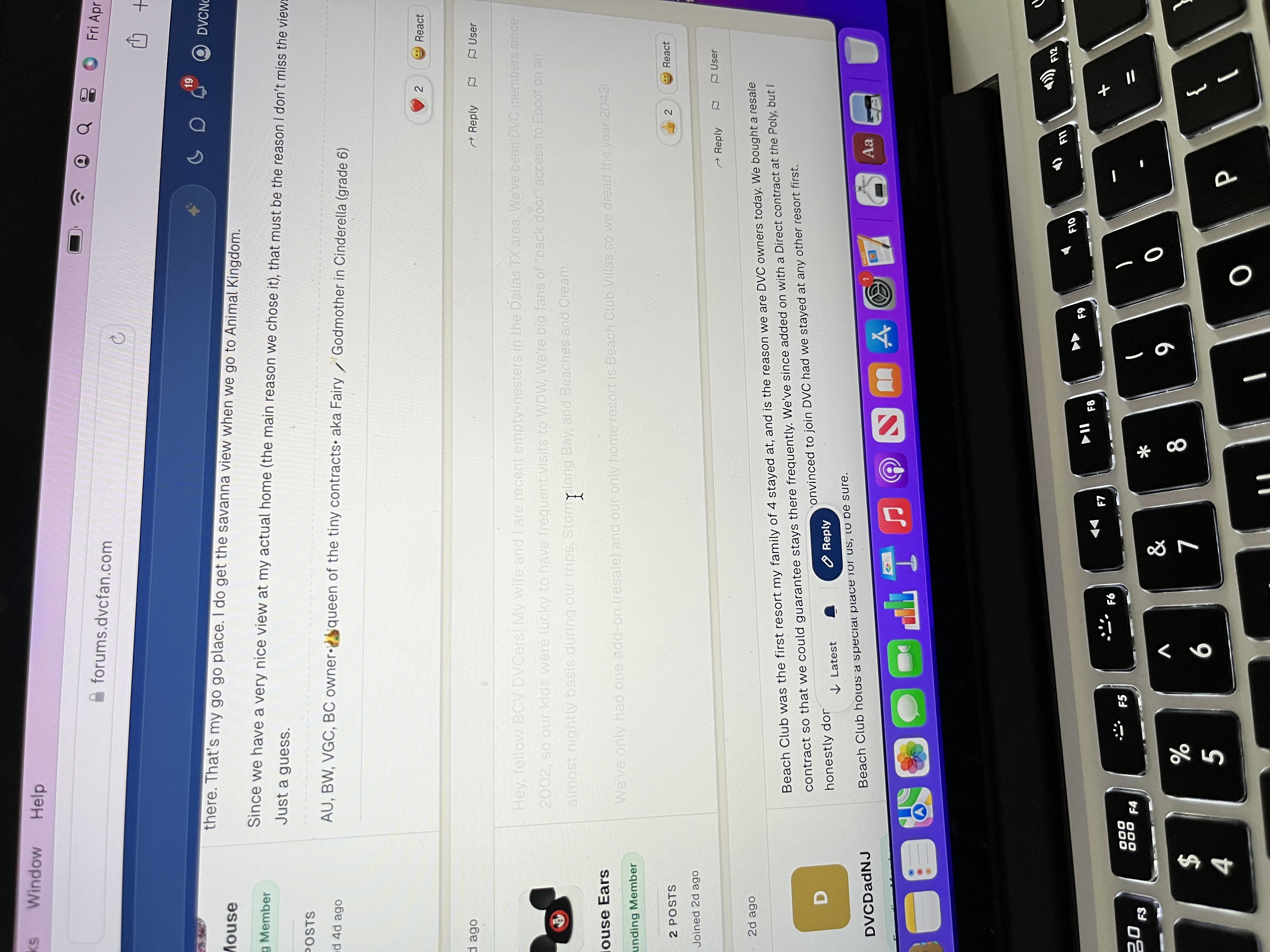
Another question - I see here and there a post - but I am not able to read it. Is the member new and waiting to get approved here?
Founding Member🏖️BCV Owner🌴OKW Owner🎟️WDW AP
#11•25w ago

Replying to @DVCNonna
Are we able to edit a post anytime after we have posted. Sometimes I come to a thread and can't remember if I posted on that thread. Is there somethin…
Welcome to the forums!
You’re able to edit or delete any of your posts at any time. Currently you’re able to see threads you most recently participated in on your home page under “Continue Discussing”. - Adding a way to add a tag / quickly show your previous posts in a thread could be a very helpful feature! Thank you for the feedback on that!
Feel free to take a look at our field guide at forums.dvcfan.com/guide as you’re learning and feel free to ask any questions - we’re happy to help!
Home Resorts: Polynesian, Saratoga Springs, ??Lakeshore Lodge??
👟runDisney🌊DVC West Coast🎟️WDW AP🐎SSR Owner🌺PVB OwnerFounding Member
#12•25w ago
Replying to @DVCNonna
Another question - I see here and there a post - but I am not able to read it. Is the member new and waiting to get approved here?
At this time everyone is auto approved so you’re able to post and view all threads immediately.
Would you be able to send a picture/link of what you’re seeing? Every post should be visible unless they deleted it or it’s been reported multiple times for moderator review.
Home Resorts: Polynesian, Saratoga Springs, ??Lakeshore Lodge??
👟runDisney🌊DVC West Coast🎟️WDW AP🐎SSR Owner🌺PVB OwnerFounding Member
#13•25w ago
I did take two random pictures just now. Which Icon do I use to attach/upload a picture ith my iPhone? I am no good with the computer. TIA
Founding Member🏖️BCV Owner🌴OKW Owner🎟️WDW AP
#14•25w ago
Replying to @DVCNonna
I did take two random pictures just now. Which Icon do I use to attach/upload a picture ith my iPhone? I am no good with the computer. TIA

Hey! You can use the Image icon in the top right of the editor. It'll display a modal where you can select/upload an image and then insert it into the reply
Home Resorts: Polynesian, Saratoga Springs, ??Lakeshore Lodge??
👟runDisney🌊DVC West Coast🎟️WDW AP🐎SSR Owner🌺PVB OwnerFounding Member
#15•24w ago
Founding Member🏖️BCV Owner🌴OKW Owner🎟️WDW AP
#16•24w ago
Replying to @bendev404
Hey! You can use the Image icon in the top right of the editor. It'll display a modal where you can select/upload an image and then insert it into the…
Thank you so much.
It's hard to see what the icon was. Appreciate it.
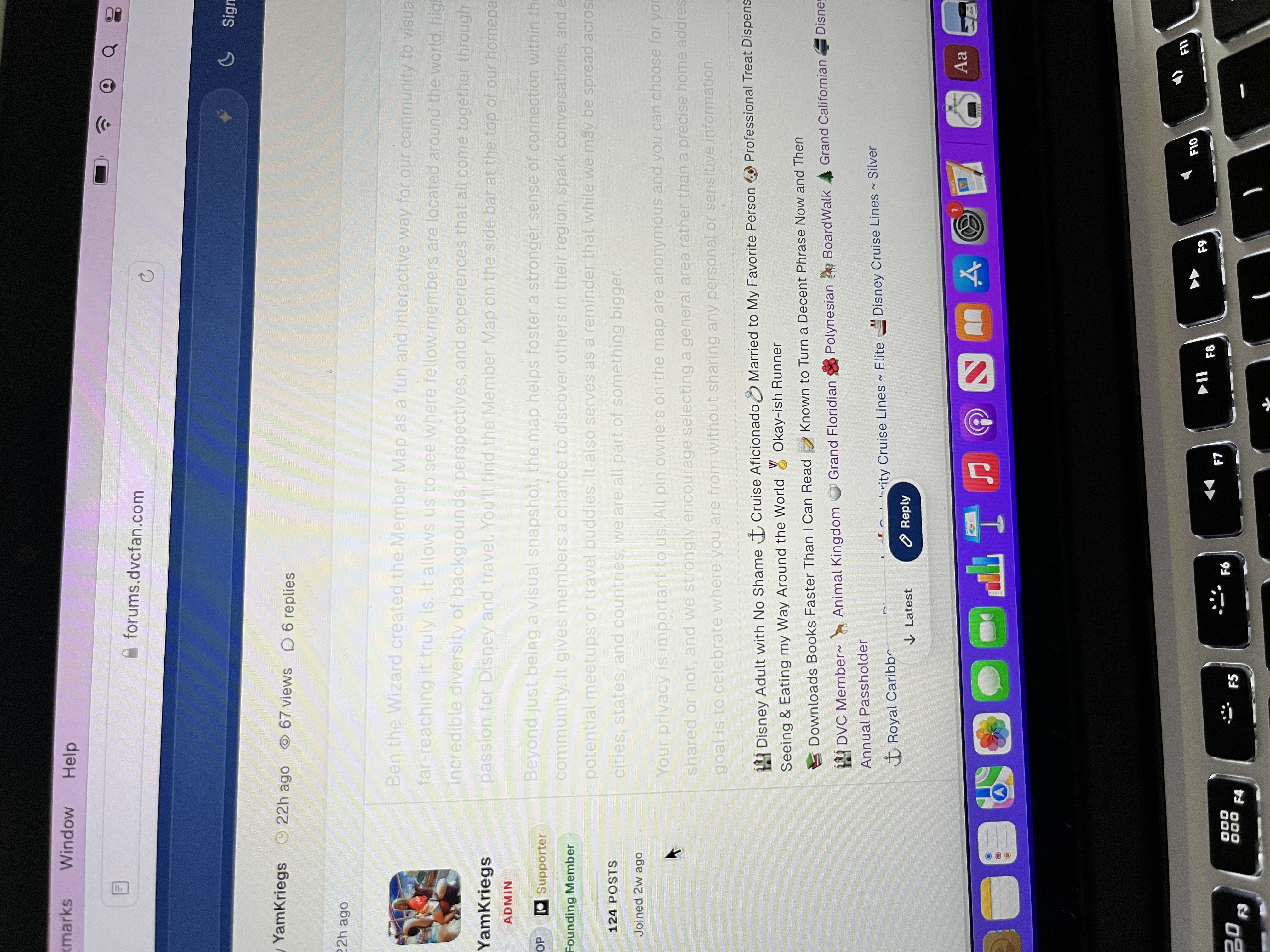
I posted what I see when the post is not clear. A few of them come up that way. Someone else posted the same thing happening.
Trying to navigate this. After I posted with my iPhone, had to search for this thread again. I am trying - found it under replies. :)
Thank you.
Founding Member🏖️BCV Owner🌴OKW Owner🎟️WDW AP
#17•24w ago
Founding Member🏖️BCV Owner🌴OKW Owner🎟️WDW AP
#18•24w ago
some of the threads are very long with replies. Do they break up in pages after so many replies? TIA.
Founding Member🏖️BCV Owner🌴OKW Owner🎟️WDW AP
#19•24w ago
Replying to @DVCNonna
some of the threads are very long with replies. Do they break up in pages after so many replies? TIA.
Yep! They do start breaking into pages.
🏰 Disney Adult with No Shame ⚓️ Cruise Aficionado💍 Married to My Favorite Person
🐶 Professional Treat Dispenser 🌎 Seeing & Eating my Way Around the World 🏅 Okay-ish Runner
📚 Downloads Books Faster Than I Can Read ✏️ Known to Turn a Decent Phrase Now and Then
🦒AKV Owner🫖VGF Owner🎡BWV Owner🌺PVB Owner🌳VGC Owner🧳DVC Both Coast+3
#20•24w ago
Replying to @DVCNonna
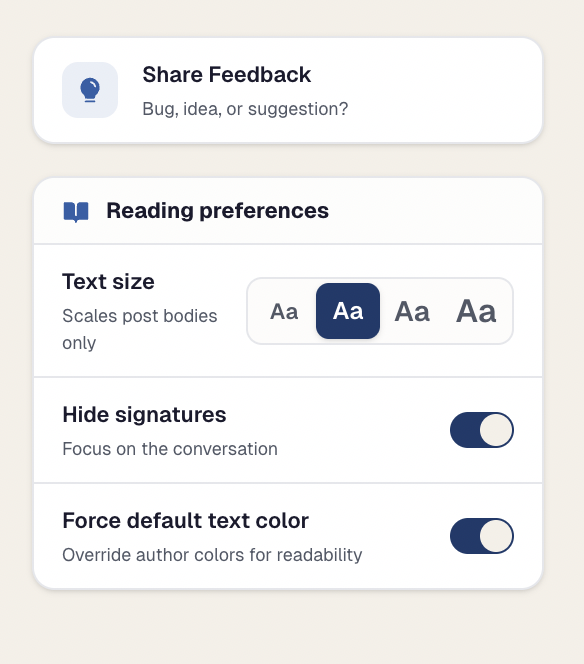
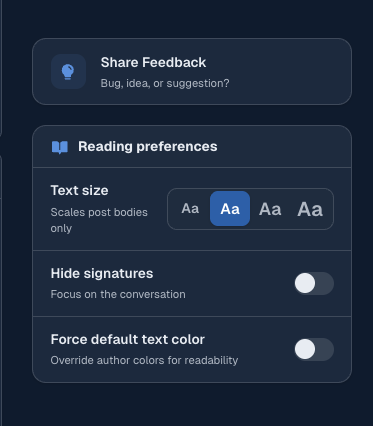
To help with this issue you can use the "Force Default Color" toggle to force all text to be the same color (black in light mode)
Home Resorts: Polynesian, Saratoga Springs, ??Lakeshore Lodge??
👟runDisney🌊DVC West Coast🎟️WDW AP🐎SSR Owner🌺PVB OwnerFounding Member
#21•24w ago
Replying to @DVCNonna
On the right side of the screen when in a thread, you can choose to force the default color instead of what the author chooses to make it easier for you to read. You can also make other adjustments there such as the size of font and if you want to see signatures or not.
🏰 Disney Adult with No Shame ⚓️ Cruise Aficionado💍 Married to My Favorite Person
🐶 Professional Treat Dispenser 🌎 Seeing & Eating my Way Around the World 🏅 Okay-ish Runner
📚 Downloads Books Faster Than I Can Read ✏️ Known to Turn a Decent Phrase Now and Then
🦒AKV Owner🫖VGF Owner🎡BWV Owner🌺PVB Owner🌳VGC Owner🧳DVC Both Coast+3
#22•24w ago
Replying to @bendev404
To help with this issue you can use the "Force Default Color" toggle to force all text to be the same color (black in light mode)
JINX
🏰 Disney Adult with No Shame ⚓️ Cruise Aficionado💍 Married to My Favorite Person
🐶 Professional Treat Dispenser 🌎 Seeing & Eating my Way Around the World 🏅 Okay-ish Runner
📚 Downloads Books Faster Than I Can Read ✏️ Known to Turn a Decent Phrase Now and Then
🦒AKV Owner🫖VGF Owner🎡BWV Owner🌺PVB Owner🌳VGC Owner🧳DVC Both Coast+3
#23•24w ago
I changed the font color for the words in my signature but it's only showing black for me. Anyone know why that would be?
*Upcoming Trips: June 2026 VGC, January 2027 BRV, June 2027 VDH*
Founding Member🌳VGC Owner🚂BRV Owner🏰VDH Owner
#24•24w ago
Also, is there a way to tell if a post I commented on has had more posts added since the last time I visited? I don't want to have to click through every single one to check for updates/comments.
*Upcoming Trips: June 2026 VGC, January 2027 BRV, June 2027 VDH*
Founding Member🌳VGC Owner🚂BRV Owner🏰VDH Owner
#25•24w ago
Replying to @Clara
I changed the font color for the words in my signature but it's only showing black for me. Anyone know why that would be?
Do you have the “Force Default Text Color” turned on? That’ll force your signature to show as black
Home Resorts: Polynesian, Saratoga Springs, ??Lakeshore Lodge??
👟runDisney🌊DVC West Coast🎟️WDW AP🐎SSR Owner🌺PVB OwnerFounding Member
#26•24w ago
Replying to @Clara
Also, is there a way to tell if a post I commented on has had more posts added since the last time I visited? I don't want to have to click through ev…
Yes! Once you’ve commented on a post it’ll show in your “following” section on the Home Screen and notifications. On the “following” page there will be a dot next to each thread with new posts/replies you haven't read yet
Home Resorts: Polynesian, Saratoga Springs, ??Lakeshore Lodge??
👟runDisney🌊DVC West Coast🎟️WDW AP🐎SSR Owner🌺PVB OwnerFounding Member
#27•24w ago
Replying to @bendev404
Do you have the “Force Default Text Color” turned on? That’ll force your signature to show as black
Nope, I don't. And I can see color in other people's signatures too. Hmm.
*Upcoming Trips: June 2026 VGC, January 2027 BRV, June 2027 VDH*
Founding Member🌳VGC Owner🚂BRV Owner🏰VDH Owner
#28•24w ago
Replying to @bendev404
Yes! Once you’ve commented on a post it’ll show in your “following” section on the Home Screen and notifications. On the “following” page there will b…
Thanks. I just see the dots just now. When I click the thread, it just takes me to the top of it. Is there anyway for it to automatically take me to the first post of the thread that is unread to me?
*Upcoming Trips: June 2026 VGC, January 2027 BRV, June 2027 VDH*
Founding Member🌳VGC Owner🚂BRV Owner🏰VDH Owner
#29•24w ago
Replying to @Clara
Thanks. I just see the dots just now. When I click the thread, it just takes me to the top of it. Is there anyway for it to automatically take me to t…
Not currently - but that's a feature we're looking at adding in the near future
Home Resorts: Polynesian, Saratoga Springs, ??Lakeshore Lodge??
👟runDisney🌊DVC West Coast🎟️WDW AP🐎SSR Owner🌺PVB OwnerFounding Member
#30•24w ago
Replying to @YamKriegs
On the right side of the screen when in a thread, you can choose to force the default color instead of what the author chooses to make it easier for y…
So I went to Account settings and was able to change the font size and the default color......happy I found it in settings. I was about to come here to say I don't see it.
If I want to follow a thread and not ready to reply, don't see where I follow. Coming along here.....Bear with me. TIA
Founding Member🏖️BCV Owner🌴OKW Owner🎟️WDW AP
#31•24w ago
Replying to @Clara
Nope, I don't. And I can see color in other people's signatures too. Hmm.
Which color did you set it to? When I view it, it's pretty close to black in color.
Home Resorts: Polynesian, Saratoga Springs, ??Lakeshore Lodge??
👟runDisney🌊DVC West Coast🎟️WDW AP🐎SSR Owner🌺PVB OwnerFounding Member
#32•24w ago
It was green, blue, red, and purple.
*Upcoming Trips: June 2026 VGC, January 2027 BRV, June 2027 VDH*
Founding Member🌳VGC Owner🚂BRV Owner🏰VDH Owner
#33•24w ago
Replying to @DVCNonna
So I went to Account settings and was able to change the font size and the default color......happy I found it in settings. I was about to come here t…
Hey! In the action bar there's a bell icon where you can select between 3 different settings (follow with notifications, follow without notifications, do not follow)
For not being able to view it in the thread, are you on mobile? It gets moved to the action bar with a book icon on smaller screens to save space on the right side.
Home Resorts: Polynesian, Saratoga Springs, ??Lakeshore Lodge??
👟runDisney🌊DVC West Coast🎟️WDW AP🐎SSR Owner🌺PVB OwnerFounding Member
#34•24w ago
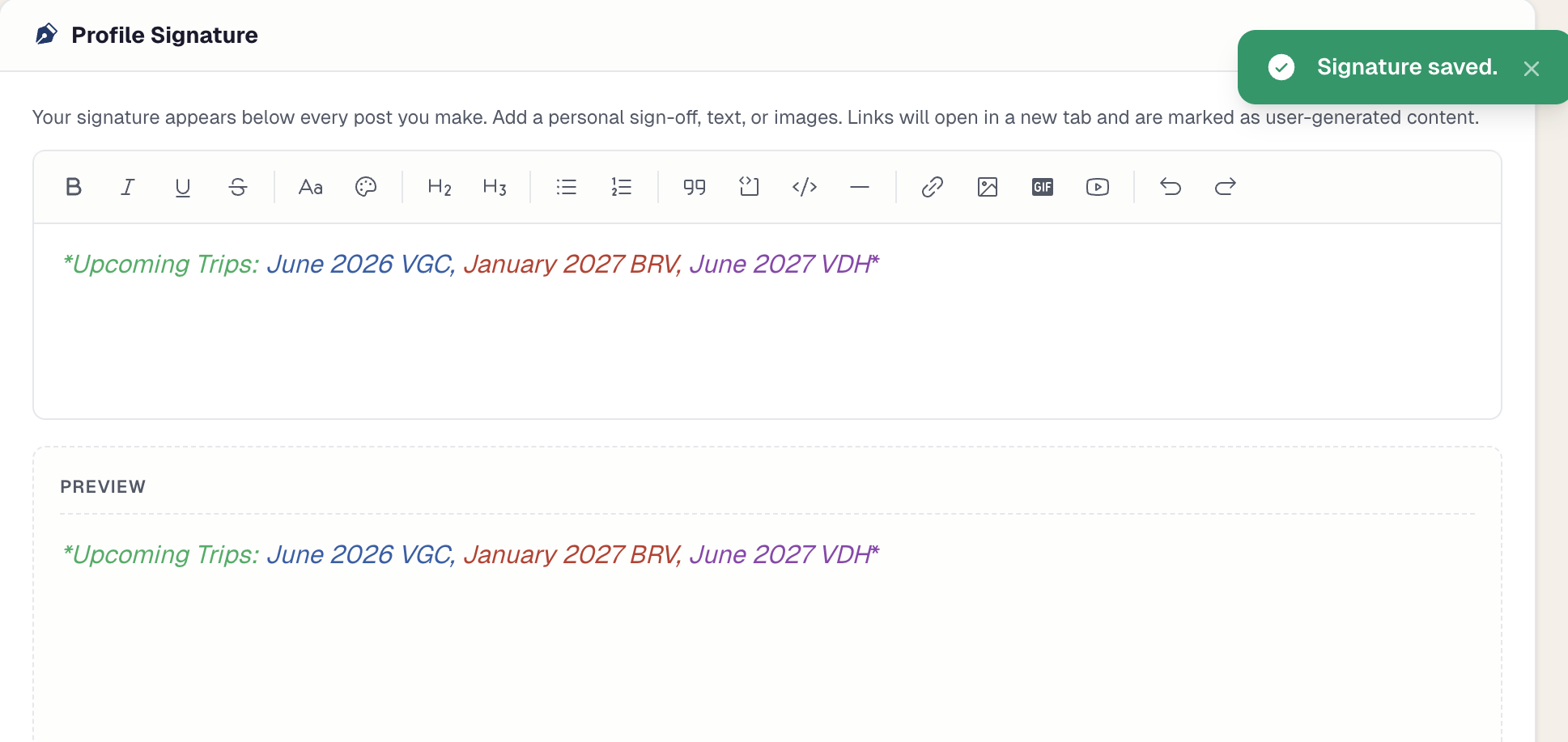
Just tried changing the color again. Maybe it doesn't allow for 4 different colors?
Here's a screenshot showing I saved it.
*Upcoming Trips: June 2026 VGC, January 2027 BRV, June 2027 VDH*
Founding Member🌳VGC Owner🚂BRV Owner🏰VDH Owner
#35•24w ago
Replying to @Clara
Just tried changing the color again. Maybe it doesn't allow for 4 different colors? Here's a screenshot showing I saved it.
No, there's no color limit. I believe I found the bug that's overriding the color on your signature -- pushing a bug fix now
Home Resorts: Polynesian, Saratoga Springs, ??Lakeshore Lodge??
👟runDisney🌊DVC West Coast🎟️WDW AP🐎SSR Owner🌺PVB OwnerFounding Member
#36•24w ago
Replying to @Clara
Just tried changing the color again. Maybe it doesn't allow for 4 different colors? Here's a screenshot showing I saved it.
Would you be able to try saving your signature with those colors again? -- I just tested the bug fix with my signature and was able to save with 4 colors.
Home Resorts: Polynesian, Saratoga Springs, ??Lakeshore Lodge??
👟runDisney🌊DVC West Coast🎟️WDW AP🐎SSR Owner🌺PVB OwnerFounding Member
#37•24w ago
It looks like it worked! Thanks so much!
*Upcoming Trips: June 2026 VGC, January 2027 BRV, June 2027 VDH*
Founding Member🌳VGC Owner🚂BRV Owner🏰VDH Owner
#38•24w ago
Replying to @bendev404
Hey! In the action bar there's a bell icon where you can select between 3 different settings (follow with notifications, follow without notifications,…
Usually on my laptop. There is a bell with the number of notifications I guess since my last visit/replies - next to my screen name to logged in. When I click on the bell, I do see to my left
All
Unread,
Replies and
@mentions
Not sure if it's this - but still don't see an icon for following. You can give up on me anytime lol.
Founding Member🏖️BCV Owner🌴OKW Owner🎟️WDW AP
#39•22w ago
SkylinerSunsets Supporter
SupporterSkylinerSunsetsSupporter
SupporterAny plans to make the forums more mobile friendly? I seem to be struggling to navigate and reply while in mobile and that’s usually when I’m browsing topics and catching up, otherwise, great site!
Founding Member🍁Canadian DVC🌺PVB Owner🚢Castaway Club
#40•21w ago
Couple of questions.
Is there a “whats new” button or anyway to return to something youre following or have posted in? It feels like i have to seerch to find the conversations im invested in and interested in.
I find that sometimes i have to double click things to get them to react (smileys, links, buttons, etc) Is it just my phone or is there a setting?
*WWWD*
~DVC Trips~
2024 - Jan AKV (Kidani), BWV, BRV - Dec VGC
2025 - Jan OKW - Oct BWV,BLT
2026 - Jan AKV (Kidani), BWV, BLT - April VGC - Dec VB, BWV
Founding Member🎡BWV Owner🦒AKV Owner🚝BLT Owner🌳VGC Owner🌊DVC West Coast
#41•21w ago
Replying to @Chili327
Couple of questions. Is there a “whats new” button or anyway to return to something youre following or have posted in? It feels like i have to seerch …
Hi there! If you scroll down on the homepage, you'll have a "Continuing Discussing" sections with the most recent four threads you have commented on. Next to that is "Following" which also shows threads you have interacted with. You will also receive notifications in the top left corner (notification bell) for any threads where someone commented that you have also interacted with. If you have any suggestions, please feel free to add them to the feature/bug request on the right hand side.
🏰 Disney Adult with No Shame ⚓️ Cruise Aficionado💍 Married to My Favorite Person
🐶 Professional Treat Dispenser 🌎 Seeing & Eating my Way Around the World 🏅 Okay-ish Runner
📚 Downloads Books Faster Than I Can Read ✏️ Known to Turn a Decent Phrase Now and Then
🦒AKV Owner🫖VGF Owner🎡BWV Owner🌺PVB Owner🌳VGC Owner🧳DVC Both Coast+3
#42•21w ago
Replying to @SkylinerSunsets
Any plans to make the forums more mobile friendly? I seem to be struggling to navigate and reply while in mobile and that’s usually when I’m browsing …
Hello! Yes we are definitely looking at more mobile improvements to the website! I hope to spend some time soon on these -- please let us know any and all feedback and we can look at addressing them ASAP!
Home Resorts: Polynesian, Saratoga Springs, ??Lakeshore Lodge??
👟runDisney🌊DVC West Coast🎟️WDW AP🐎SSR Owner🌺PVB OwnerFounding Member
#43•16w ago

Is anyone else finding that the mobile version of these forums often lags or freezes?
Home Resorts: Aulani 🌺 Grand Cal 🐻 Disneyland Hotel 🚝 Grand Floridian 👑 Boardwalk 🎢
Founding Member🎇Comma Club
#44•16w ago
Yes, pretty frequently.
Contracts: AKV, Poly, CCV
Trips: 2016 - ASM // 2017 - POFQ & AS // May 2018 - AKV & BC // Sept. 2018 - BC, CC & BLT // Jan. 2019 - AKV & Poly // July 2019 - OKW & BWV // Dec. 2019 - Disney Dream // May 2021 - VGF & AKV // Jan. 2022 - Poly & AKV // Jan. 2023 - Poly & AKV //July 2023 - BLT // June 2024 - VDH // July 2025 - VGC // Oct 2025 - Riv, Poly & AKV // July 2026 AKV & BCV
Founding Member🦒AKV Owner🌺PVB Owner🌲CCV Owner👟runDisney
#45•16w ago
Replying to @AstroBlasters
Is anyone else finding that the mobile version of these forums often lags or freezes?
Thank you for letting us know! @bendev404 can hopefully look into it soon and get it running more smoothly.
🏰 Disney Adult with No Shame ⚓️ Cruise Aficionado💍 Married to My Favorite Person
🐶 Professional Treat Dispenser 🌎 Seeing & Eating my Way Around the World 🏅 Okay-ish Runner
📚 Downloads Books Faster Than I Can Read ✏️ Known to Turn a Decent Phrase Now and Then
🦒AKV Owner🫖VGF Owner🎡BWV Owner🌺PVB Owner🌳VGC Owner🧳DVC Both Coast+3
#46•16w ago
Hey! Yeah thanks for letting us know! I’ve also noticed this issue while using the forums on my phone.
One culprit was the “DVC Tools” Popover. On mobile it appears to at times block all interations on the screen unless you double tap/spam press the action you want to perform. This even happens when the Popover is not visibile, which is why the entire forums appear frozen at times. It’s been switched to use the same dropdown, removing the Popover from the entire forums. This should hopefully help for most pages.
I’m still investigating the issue on the threads page — have pushed some initial bug fixes but there’s still a “double-click” to press anything.
I’ll keep you posted on more fixes later today! Please let me know if you have any other problems!
Home Resorts: Polynesian, Saratoga Springs, ??Lakeshore Lodge??
👟runDisney🌊DVC West Coast🎟️WDW AP🐎SSR Owner🌺PVB OwnerFounding Member
#47•16w ago
I've pushed up a few more bug fixes that should help with the problem! Also noticed it propped up when you had a specific post highlighted it could also cause the same double-tap behavior. Please let me know if you continue to have any issues! I'll keep an eye out for any other issues and fixes while using the forums as well!
Home Resorts: Polynesian, Saratoga Springs, ??Lakeshore Lodge??
👟runDisney🌊DVC West Coast🎟️WDW AP🐎SSR Owner🌺PVB OwnerFounding Member
#48•16w ago

DisneygrandpaSupporter
SupporterDisneygrandpaSupporter
SupporterFor the most part I like how this forum is evolving. All the recent changes have been pretty great and is really helping the usability. One thing I would love to see is a way to list all the recent posts across ALL forums and threads. Perhaps I am just missing it. In notifications I can see activity on my watched threads, but seem to miss when a new thread/topic is started. Does all mean all new postings across all topics/threads?
Member since 1996. BWV, AKV, BLT, VDH, VGC. Working on a better Signature
Founding Member🧳DVC Both Coast🎇Comma Club🎟️WDW AP
#49•15w ago
Replying to @Disneygrandpa
For the most part I like how this forum is evolving. All the recent changes have been pretty great and is really helping the usability. One thing I wo…
We do have a recent activity thread and dedicated page here: https://forums.dvcfan.com/recent-activity. This shows all recent conversations across all of the forums/threads. Let me know if this is what you're looking for! Happy to add anything else as well to help make it easier to navigate
Home Resorts: Polynesian, Saratoga Springs, ??Lakeshore Lodge??
👟runDisney🌊DVC West Coast🎟️WDW AP🐎SSR Owner🌺PVB OwnerFounding Member
#50•15w ago
DisneygrandpaSupporter
SupporterDisneygrandpaSupporter
SupporterReplying to @bendev404
We do have a recent activity thread and dedicated page here: https://forums.dvcfan.com/recent-activity. This shows all recent conversations across all…
Love the page. Is there a button or menu item. I can just bookmark it, but it would be great to have this page handy like on the sidebar or in the notifications. Or am I just missing it?
Member since 1996. BWV, AKV, BLT, VDH, VGC. Working on a better Signature
Founding Member🧳DVC Both Coast🎇Comma Club🎟️WDW AP
#51•13w ago
Replying to @bendev404
I've pushed up a few more bug fixes that should help with the problem! Also noticed it propped up when you had a specific post highlighted it could al…
Thank you, @bendev404. it is much smoother now.
Contracts: AKV, Poly, CCV
Trips: 2016 - ASM // 2017 - POFQ & AS // May 2018 - AKV & BC // Sept. 2018 - BC, CC & BLT // Jan. 2019 - AKV & Poly // July 2019 - OKW & BWV // Dec. 2019 - Disney Dream // May 2021 - VGF & AKV // Jan. 2022 - Poly & AKV // Jan. 2023 - Poly & AKV //July 2023 - BLT // June 2024 - VDH // July 2025 - VGC // Oct 2025 - Riv, Poly & AKV // July 2026 AKV & BCV
Founding Member🦒AKV Owner🌺PVB Owner🌲CCV Owner👟runDisney